
Explore the Microsoft Learning Accelerators: Your Guide to Reflect, Reading, Search, and Speaker Progress
If you are looking to enhance learning, teaching and assessment and empower learners in identifying their next steps, Microsoft’s Learning Accelerators can undoubtedly support you. This suite of learning accelerators is here to empower teachers and learners alike. Here’s a rundown of some fantastic resources and our quick courses that will help you get started.
Microsoft Reflect: Supporting Wellbeing in Your Classroom
This online course dives into the features of Microsoft Reflect, a wellbeing accelerator designed for your class Teams page. Learn how to set it up for your class, create wellbeing check-ins, and access insightful results and data trends. Reflect also includes a suite of Calm mindfulness features that help craft a supportive environment for learners.
Microsoft Reading Coach: Personalised Literacy Support
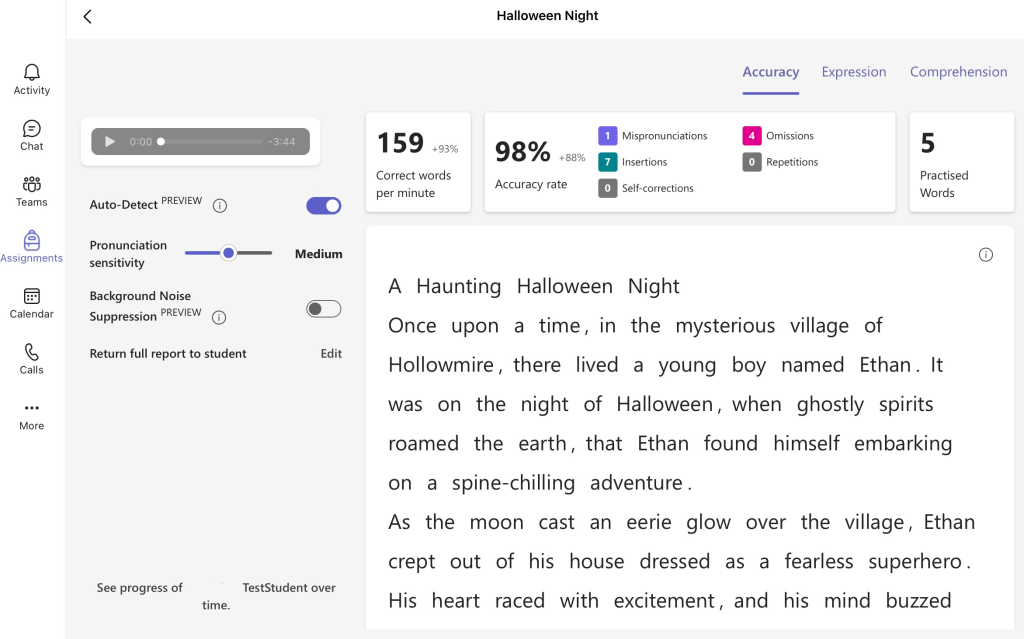
Discover the many features of Microsoft’s Reading Coach in this short video course. It offers detailed analytics and targeted support to enhance learners’ literacy skills. Whether you’re using Teams, Word (Web), or Class Notebook, this course shows you how to integrate Reading Coach into your class workflow solution and help learners succeed.
Microsoft Reading Coach via Browser
A recently added alternative to accessing Reading Coach via Teams is the ability to do so through the browser. Without the need to set specific assignments, teachers can plan targeted reading practice for learners – who simply need to join using their Office 365 details and a class code. Learners also have the ability to work on set reading targets, receive support on targeted words, and create their own reading materials using the AI tools built into platform to explore characters and settings.
Microsoft Reading Progress: A Game-Changer for Literacy
With Reading Progress, explore new ways for you to support literacy in the classroom. This video course demonstrates how to use the tool to assess reading fluency, provide detailed feedback, and even generate comprehension questions. Whether you’re tracking progress or targeting specific skills, Reading Progress is a practical and powerful addition to your teaching toolkit.
Microsoft Search Coach: Building Digital Literacy
Equip your class with critical search and digital literacy skills using Search Coach. This video course shows how the tool enhances safe internet use, teaches effective filtering techniques, and builds critical thinking skills. Perfect for integrating into research projects and everyday learning activities.
Microsoft Speaker Progress: Supporting Presentation and Communication Skills
Helping learners improve their listening and speaking skills is easy with Microsoft Speaker Progress. This course walks you through setup, provides tips for using Rehearse with Coach in PowerPoint, and shows how to offer detailed feedback to learners. Support them in identifying next steps and building confidence in their presentation abilities.
Microsoft Maths Progress: Supporting Numeracy and Mathematics
Using Maths Progress, educators can craft their own numeracy and mathematics questions on topics such as the four operations, factors, decimals, fractions, expressions and equations, and algebra. As well as being able to create your own questions, Maths Progress can generate questions for educators, allowing them to choose those that fit the learning needs of their students. Learners can rate the difficulty level of questions and are encouraged to submit evidence of their workings out – either via a photo of their jotters or screenshot of work from their Notebook.
With these accessible and practical courses, you can start using Microsoft learning accelerators to transform your classroom and empower your learners. Which tool will you try first? Click the links below to get started.
 Edinburgh Learns Digital | City of Edinburgh Council